



Price: $49.99
(as of Jan 20, 2026 08:03:57 UTC – Details)
Product description

Stay Informed of Power Outages and Restoration with Power Pal – Your Trusted Power Outage Monitor

Stay Informed of Power Outages with Power Pal!
Experience peace of mind with PowerPal – your trusted power outage monitor for your home or office. Stay connected and protected with instant notifications, ensuring you’re always in control, even when the lights go out.
Features:
Instant Power Outage Alerts: PowerPal is your watchful guardian. Receive immediate SMS or email alerts when a power outage occurs, ensuring you’re always informed.Seamless Setup: Experience effortless installation. Insert PowerPal into a standard outlet, connect your device, and follow the user-friendly setup guide. No technical expertise is required.Reliable Connection: PowerPal employs advanced technology for power monitoring. Count on timely notifications without delays.Customizable Alerts: Tailor notifications to your needs. Choose SMS or email alerts and specify recipients, ensuring the right people are notified.Compact Design: PowerPal’s sleek design ensures it won’t block neighboring outlets. Its unobtrusive form fits seamlessly into any receptacle space.
How Power Pal Works:
Power Pal transmits a ‘heartbeat’ signal to our servers, which monitor it.If the signal stops, configured user alerts (during setup) via email/text are sent.When the signal resumes, user-configured restoration messages (during setup) are sent.
Places Where Power Pal Shines

Home Sweet Home
Keep your home safe and secure during storms and outages. PowerPal ensures you’re aware of any power interruptions, allowing you to take necessary precautions.

Office Resilience
Stay productive at work. PowerPal keeps you informed of power outages so you can manage critical tasks, safeguarding against data loss and disruptions.

Vacation Peace of Mind
Travel with ease. PowerPal notifies you of outages even when you’re away, giving you the chance to remotely manage your home and minimize potential issues.

Medical Setting
Ensure uninterrupted medical care. Power Pal notifies medical facilities about power interruptions, allowing them to switch to backup systems and prioritize patient safety.
Power Pal is Easy to Setup! Your Plug-and-Play Power Outage Monitor
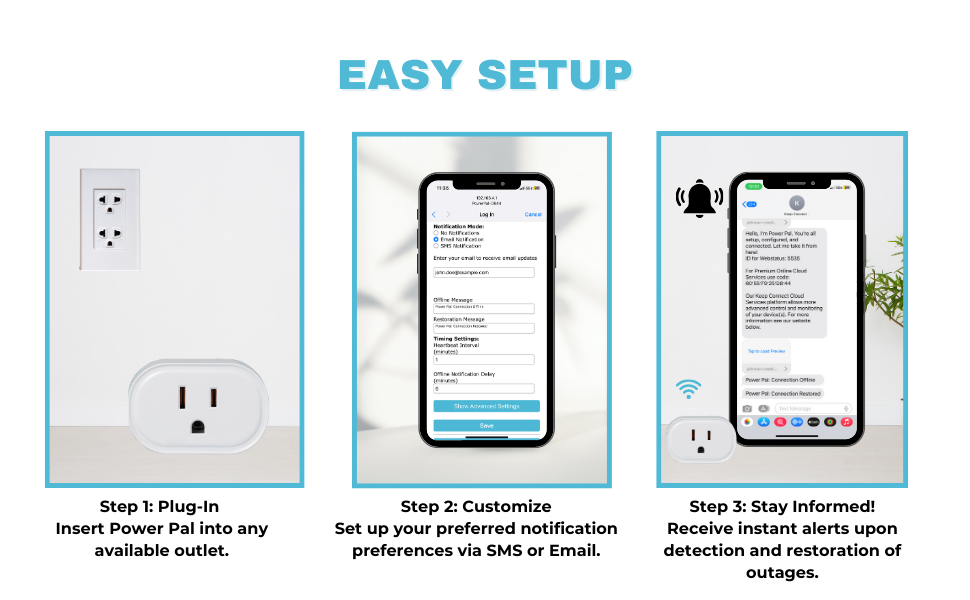
Real-time Power Outage Notifications – Power Pal continuously monitors the power within your location, enabling you to receive real-time text or email notifications whenever a power outage occurs.
Compact Design – Power Pal features a compact and space-saving design, ensuring it seamlessly blends into any environment without taking up too much receptacle space.
Smart and Reliable – PowerPal works seamlessly with or without connected devices. Use it as a standalone power outage monitor, providing convenience and peace of mind.
Easy Setup – Simply plug PowerPal into any standard outlet and set it up with no app required, no fees for texts/email notifications. You can also connect it to your Keep Connect Mobile App to use it with your Cloud Services account. It integrates effortlessly into your smart home ecosystem, making it a handy and must-have IoT Device.
Industry-leading Customer Service – Our support team is dedicated to providing you with a top-notch customer service and technical support. Whether you have questions, need assistance, or require troubleshooting, our team is available to help you every step of the way.
8 reviews for Power Pal Power Monitoring Device. Smart Plug with Power Outage Notifications via Text or Email. Monitors Power Within The Location, with or Without Connected Devices
Add a review
Related products


- SAR: ﷼206.25
- PKR: ₨ 15,316.92
- AED: AED201.96


- SAR: ﷼300.01
- PKR: ₨ 22,280.42
- AED: AED293.77


- SAR: ﷼187.49
- PKR: ₨ 13,924.22
- AED: AED183.59


- SAR: ﷼19.69
- PKR: ₨ 1,462.34
- AED: AED19.28


Electronics
- SAR: ﷼149.99
- PKR: ₨ 11,138.81
- AED: AED146.87

Electronics
Mini Handheld USB Fan – Colorful Rechargeable Portable Fan for Summer | Desk & Travel Use
- SAR: ﷼15.00
- PKR: ₨ 1,114.16
- AED: AED14.69


- SAR: ﷼337.52
- PKR: ₨ 25,065.82
- AED: AED330.50


Electronics
Roku Streaming Stick HD 2025 — HD Streaming Device for TV with Roku Voice Remote, Free & Live TV
- SAR: ﷼107.57
- PKR: ₨ 7,988.53
- AED: AED105.33
TheWayISeeIt –
Does what it says! Great buy. Very pleased.
Does what it says! 1st set up attempt was a bit slow and confusing but I think it was user error more than not great instructions, because it connected quickly and easily when I followed them the second attempt. I tested it myself immediately with success. And since, have had a couple of storm outages where it did exactly what I bought it for. Great buy. Very pleased.
LM –
User Interface for initial setup is pure JUNK!
Great idea… HORRIBLE execution!Having set up and connected hundreds of wired and wireless (WiFi) devices in my 3 homes in the past 15+ years, I have to say the process to connect this device eluded me.The User Interface and process is similar to, but is MUCH worse than Wyze’s initial camera setup process about years ago. That’s how archaic this process is. It is time for Keep Connect to join the rest of us in 2023 with WiFi connectivity.To the designers / developers:1. How cheap do you have to be to provide an instruction sheet so small I feel like I need tweezers to hold it, and with a print font so tiny, that a 5x magnifying glass is needed to read it? Spend a few more pennies for a readable instruction guide.2. Spend some more money for a simpler initial, device setup process. The days of needing to use a web browser with a numeric IP address are ancient history.This product is NOT ready for market!I will be returning it ASAP!
Aaron Tennyson –
Perfect for basement freezer!
After being forced to throw away several hundred dollars worth of frozen meat due to a faulty GCFI outlet I knew I needed a way to ensure that wouldn’t happen again. Power Pal works perfect and is a simple solution to an expensive problem. Now if the power goes out or an outlet trips I get notified within minutes.
Julie –
Keep connect
This device works fabulously!! Super happy with it. It restarts our modem when our internet disconnects! And notifies us when it occurs!! Love this device!!
Kristi David –
Frustrated
4 persons later and not one techi can get this to set up. It’s not doing what your instructions say it will do. Really do want this to work. Stuck in limbo.
Wes –
Works great but not easy to set up – else Id give it a 5
Im pretty experienced at reading poorly written directions and figuring my way around network setup, I do it for a living. You have to do some guess work here, I got an extension cord so that I could sit on my couch and plug/unplug the unit and repeatedly try different ways to get it going.Youll find it in your wifi list, connect to it initially to set it upSSID – is your network ID (name if your home network)password is your networks passwordOnce you have saved the initial setup, go to your Wifi network admin and find the device to see what IP it has been assignedFor example my network gateway is 10.0.0.1, the Power Pal was assigned 10.0.0.62So I put 10.0.0.62 into my browserAdmin is the device login once it is setup, use the password you gave it at the initial setupThe web server is slow and weak, if you leave it in a state that is not the home page the device will stay there and youll have to power cycle it to get back to the main setup pageBut it DOES work – it will notify you when the AC to that outlet is lost.
Heather –
Difficult setup
Difficult instructions and set up even for someone familiar with technology. however i have been notified timely each time per has went off. Good to for diagnosing electrical issues
dscec –
Saving the food in my freezer
My stand-alone freezer is in the garage. The outlet had been tripping. Only takes one time of throwing food away to realize this device is a great investment! I get an immediate text if that outlet trips and I go out and fix it! Worth it!