











Price: $34.99
(as of Jan 21, 2026 02:46:21 UTC – Details)
Product description

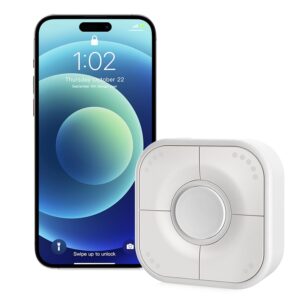
Button puts instant control at everyone’s fingertips, offering yet another way to engage connected devices. It’s beyond convenient. It’s empowering.
Direct control: command accessories and scenes without your cellphone15 actions: single press, double press, and long pressCompact & portable: fits in your pocket or desksThread-enabled: More faster and realiablePersonalized stickers: Different stickers supports more choices, you can easily find which one is belong to right keyEasy installation: Wireless design, can be places wherever you want, stick it to any surface , or magnetically attached to metal surfaces with the strong magnetLong battery life: Button battery-operated smart button, easy to replace, can last 1-year

Specifications:
Wireless connection: Thread + Bluetooth Low Energy 5.0Operating Operating temperature: 14 T ~113 F(-10 C ~45 C)Operating humidity: 5%~95% RHDimensions(LxWxH): Smart button 55*55*20mm (2.17*2.17*0.79inch)Magnetic base 59*59*10mm (2.32*2.32*0.39inch)Color: WhiteUsage: Indoor use onlyBattery: CR2450 button cell battery, 650mAhStandbyStandby time: 1 year

Smart buttons for your entire home

Sleep with confidence
Turn off all smart lights,smart plugs,speakers and TV when you need by keeping the button beside your bed.

Button up the fan in this hot summer
Easily set onvis button to control everyday necessities, such as a connected fan.

Direct control
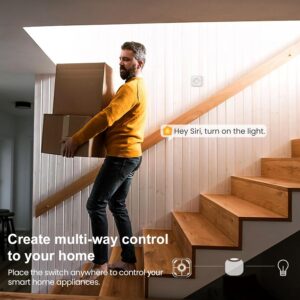
Command accessories and scenes without your iPhone. Leave garage with confidence,which need a hub that near the button.


Place it on the table/bedside, Magnetically attached to metal surfaces, Stick it on the glass wall, or instasll it with a screw.
Tips
1.Clean and dry the target surface before putting HS2 base on.
2.Keep the setup code lable for future use.
3.Do not clean with liquid
Add to Cart
Add to Cart
Add to Cart
Customer Reviews
4.0 out of 5 stars 1,756
3.8 out of 5 stars 11
4.0 out of 5 stars 176
—
4.1 out of 5 stars 159
Price
— no data
$34.99$34.99 $31.99$31.99
— no data
$19.99$19.99
Features
Motion Detection, Temperature, Humidity Door Window Contact Sensor Color Changing,Adjustable Color Temperature,DIY Mode,Dimmable,Music Sync,Remote Control&App Control Security System, Door Status Timer Schedule, APP Remote control, Voice control
Wireless Connection
Bluetooth Thread Wi-Fi Bluetooth Low Energy, Thread Thread, Matter
Works with homekit
✓
✓
✓
✓
✓
Requirements
iOS/iPadOS 16.4 (or later) iOS/iPadOS 16.4 (or later) iPhone or iPad with the latest version of iOS/iPadOS; Wi-Fi network (2.4 GHz 802.11b/g/n) iOS/iPadOS 16.4 (or later) / Android 8.1 (or later); Matter controller / Thread Border Router (find compatible devices on evehome.com/hub) iOS/iPadOS 16.4 (or later) / Android 8.1 (or later); Matter controller / Thread Border Router (find compatible devices on evehome.com/hub)
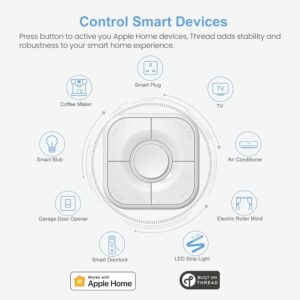
【Easy Control】Onvis Smart Button allows you to control multiple smart bulbs, smart plugs and other smart home devices.
【Thread and Bluetooth】Thread allows smart home products to connect faster and more reliably than ever.The button also support bluetooth if your devices don’t support thread.
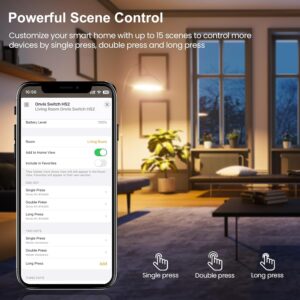
【Powerful Scene Control】5 individual keys, each supports single, double and long press, up to 15 scenes within one device.
【100% Privacy】No cloud, no tracking. Works with Apple HomeKit, all data is end-to-end encrypted and stored in your iOS devices.
【Easy To Use】Setting up the smart button in Onvis App or Home App is easy, just connect your buttons via thread or bluetooth and choose what should happen when press each key.
【Data Record】Our smart button shows commands records that can be checked with Onvis Home App.
【Easy Mounting】With the wireless and compact design, you can place the Smart Button wherever it’s handy, stick it to the wall by using the double-sided tape or attach to the fridge with the magnetic strips. Both accessories are included in the box.
【Home Hub Requirements】Requires a Thread enable Apple Home hub device set as the CONNECTED hub in iOS Home app. The Apple Thread hub model can be Apple TV 4K 2nd Gen, Apple TV 4K 3rd Gen (Wi-Fi + Ethernet), HomePod Mini or HomePod 2nd gen.
8 reviews for Onvis Smart Button, 5-Keys Smart Switch, Scene Controller, Compatible with Apple HomeKit, Automatically Trigger Accessories & Scenes-Thread (iOS 17.4 or Later is Required)
Add a review
Related products


- SAR: ﷼37.49
- PKR: ₨ 2,779.72
- AED: AED36.69


- SAR: ﷼112.54
- PKR: ₨ 8,344.72
- AED: AED110.14


- SAR: ﷼97.53
- PKR: ₨ 7,231.72
- AED: AED95.45


- SAR: ﷼19.70
- PKR: ₨ 1,460.81
- AED: AED19.28


Electronics
- SAR: ﷼675.41
- PKR: ₨ 50,082.22
- AED: AED661.00


- SAR: ﷼300.16
- PKR: ₨ 22,257.22
- AED: AED293.76


- SAR: ﷼44.99
- PKR: ₨ 3,336.22
- AED: AED44.03


- SAR: ﷼337.69
- PKR: ₨ 25,039.72
- AED: AED330.48
Jodi Dibble –
Works well, but a few minor quirks to be aware of
Five single-click buttons, room for fifteen actions, works on Thread or Bluetooth … what more could you ask for?I set this up to control our bedroom fan/light. We have a (Thread-connected) controller in the canopy which allows for dimming of the light and setting the fan to various speeds. Setting up this button (center button #1 for the light, with a single click bringing it to our normal 60%, a long click bringing it up to 100%, and a double click turning it off; button 2 turn fan off; 3-5 for high, medium, and low fan speeds) was easy and intuitive via the app.PERFORMANCE: Responsiveness is good. Not “instant” like a hard-wired button would be, but about a half second between click and the light responding. Just as a note, our thread router is a HomePod Mini about ten feet and one normal (hollow) wall away from the button, and the light canopy it is controlling is another ten feet away in the center of the room. The physical proximity and thus signal strength might be a key to how well all responds.FORM/STYLE: It is a little bulky mounted on the wall, but far from terrible. It has a quality feel, feeling solid either on the wall or in hand. Doesn’t really matter”go” with any decor style, so really is its own “tech” style; I suspect in 5-10 years more stylized versions will be available to replace this without standing out on the wall like a sore thumb. But, we don’t live in the future, and this is about the best the present has to offer unless you’re happy with a single button.THE UGLY: On the “Ugly” side, the only criticism I have is that the setup for the app says that your Homekit Hub *must* be a Thread Border Router. For us, that meant I had to designate our non-ethernet-connected Apple TV (new, but in the guest bedroom) as the Home Hub, which seems destined to cause Apple Home issues. We haven’t seen any yet, but this seems like a very odd requirement that really shouldn’t be the case, and hasn’t been a requirement for any of the other Thread devices we have. I haven’t done any experiments to see what happens if our ethernet-connected AppleTV (the general before Thread came out, so not Thread compatible) is the designated Home Hub instead so I’m not sure really what is driving this requirement for the Onvis button. This *might* be something they correct either through an app or a button firmware update in the future.One note: for a week our Eve app has been reporting that this is connected via Bluetooth instead of Thread. After looking for solutions to this, I ran across a suggestion on Reddit that said to try restarting the phone. Immediately after doing so, now the Eve app shows it as connected to Thread. I’m not sure if the issue is a cosmetic one with the Eve app (not looking at updates from the button) or the button (missing something in the Thread spec that needs to be sent out when it connects to the router etc?), or if this was a real issue with the button (meaning that it actually stayed connected to my Bluetooth until I restarted the phone … but I’ve gone miles out of bluetooth range several times so that seems unlikely). In any case, it now shows up as on the Thread network.
Shane Castillo –
Just what I was looking for…
This controller is great and just what I was looking for. I needed something to act as a smart light switch and control my other devices on HomeKit. It was nice having 5 buttons with 3 commands each which means I can have 15 different settings configured to it.I did have an issue where the controller stopped working when I moved and set up on a new Wi-Fi. After trying everything under the sun, I reached out to their customer services team. They are retaining a 5-star rating even after all my frustrations because of the great service they provided in helping me with troubleshooting and replacing.
Jianyu Chen –
Most unreliable Homekit device
I am using 10 of the Onvis door sensor, and they are one of the more reliable Homekit device I have, so imagine my disappointment with this remote button.Right after the pairing, everything works for 3 hours, then all the sudden it no longer trigger scenes. I can still see the button action in the Onvis app, but Homekit does not respond. Couple hours later everything works again, then couple hours later it does not trigger scenes anymore again. This went on for 3 days even after numerous reset and even reboot all of my Apple TV.When it works it is fast and responsive, but it only works 50% of the time and it will stop working for no reason. It is unreliable (I can’t say faulty because it likely a firmware bug), at this point I cannot live with it.
Amazon Customer –
Works as advertised for the last year (and still going)
I had gotten several of these buttons a year ago. I have them set up around the house programmed to do various actions (and shortcuts). They have been very reliable up until I installed iOS 17.4. After some great technical support by Onvis*, they had narrowed down my reliability/non-functionality problem. Turns out which ever device is your active hub will make a difference for whether the button will work. Seems the implementation of Threading in HomeKit is not what I expected and the HS2 relies on Threading to function. I have a handful of HomePod minis, 2 AppleTV 4Ks, and 2 AppleTV HDs. The HomePods and AppleTV 4Ks support Threading. The AppleTV HDs do not. If HomeKit decides to put an AppleTV HD as the active hub, my Onvis HS2s stop functioning. If I restart the AppleTV HD that is the active hub and one of my AppleTV 4Ks ends up “in charge” then Threading works again. Not quite sure why the implementation is such (which I think is “dumb”) but that was the cause of my intermittent non-functioning of the HS2s. Seems I’ll be replacing my HDs with 4Ks (ugh!) and taking the HDs off the network (or at least HomeKit). Here’s to hoping Apple can change how this behaves (including adding user prioritization for certain devices).All in all the HS2s have been great and HomeKit was a major (the major) selling point for me as that is the ecosystem I use. My only major complaint is the stickers which came with it didn’t work for some of what I had them programmed to do. I also had issues deciding how to label each button when each button has three options. For some of them I busted out my label maker with clear tape. Some are just not labeled and you “just have to know”. I don’t want to say this is one of those cases where too many options is a “bad thing” since it is very handy to have 5 buttons with 15 different actions which can be done. Having others in the house know what the buttons do, however, has been a challenge. They usually just remember a couple of high use options and forget the rest.* I really don’t know what I was expecting for support from Onvis. Until now I’ve never had to call on their support. Some of the other companies I have needed support from weren’t “bad”, per se, but sometimes the time it took to respond wasn’t the quickest (timezone differences?!?) and some of them weren’t the most technically saavy. This was definitely not the case with my interaction with Onvis tech support. They were (1) very quick to respond and (2) seemed very knowledgeable about both their product and the technologies behind how their product functions. It was very refreshing. I appreciated that. Maybe I got lucky with the person I was talking with…but I’m hopeful it’s applicable to all or most of their tech support personnel.
Felipe C. –
Buscaba switches matter over thread y tuve muy buenas referencias de este botón. Sé que es caro y en México más, pero aunque no es matter es excelente para lo que tengo en casa. Es de reacción muy rápida y no se nota frágil. Ojalá duren, compré tres.
Ahmed Al Taher –
Doesn’t work
Christian –
Es un dispositivo perfecto, jamás se desconecta, tengo 2, uno en el mismo cuarto que el border router y otro un piso abajo y los 2 funcionan a la perfección. Solo ojo, yo pensé que eran matter y no, solo son thread y funcionan únicamente con homekit.
Jaga –
Perfecto para controlar múltiples dispositivos desde un solo lugar