



Price: $319.99 - $192.99
(as of Jan 18, 2026 00:51:42 UTC – Details)
Product description

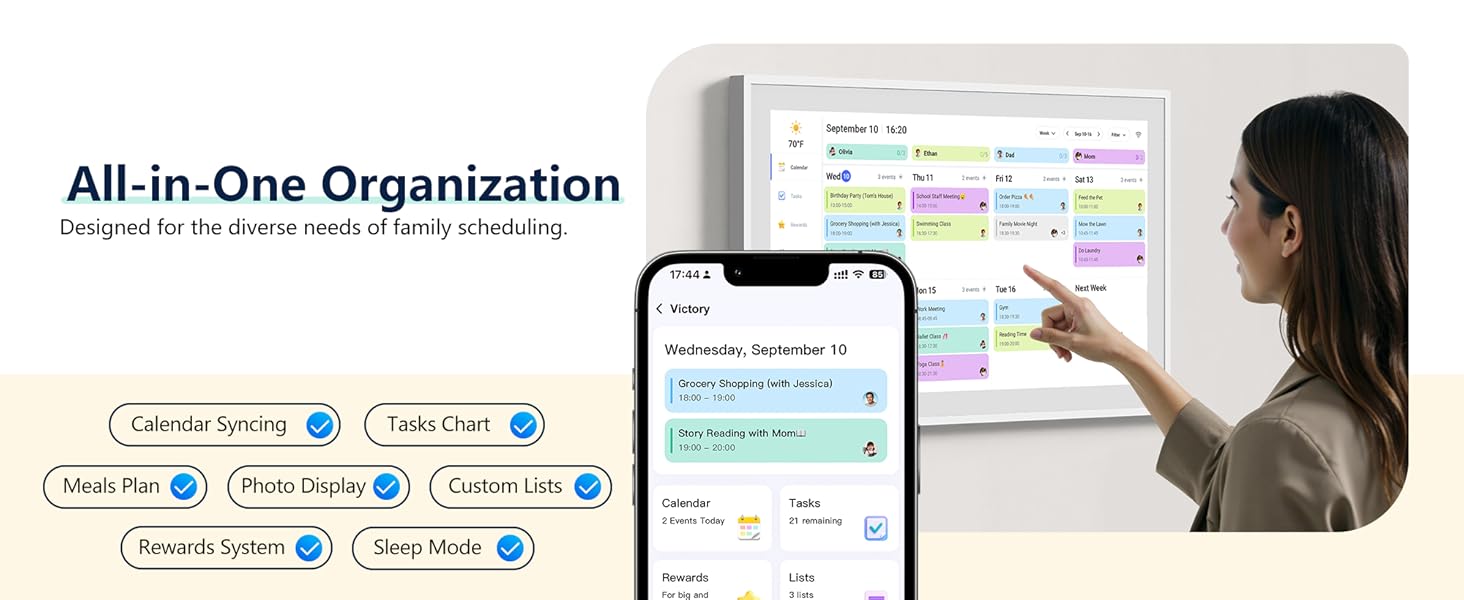



Does it support multiple calendar?
Yes, the eCalendar supports Google, iCloud, Outlook, etc.
Can it be mounted on a wall?
Yes, it can be mount on a wall.
Does the calendar has a syncing calendar feature?
Yes, it supports synchronizing events from calendars such as Google, iCloud, Outlook, etc.
How to set remind for event?
You can enable reminders on your eCalendar by clicking Settings-->Calendar-->Reminders.
Can the device display photos from shared albums?
Yes, you can use eCalendar app to upload photos from the shared albums to your device. Once uploaded, the device will display the corresponding photos.
Smart Digital Calendar: flyEVfish’s 15.6” HD touchscreen family planner, a digital calendar and chore chart built for all families. Assign colors, add tasks, and helps the whole family easily plan and manage events across different views and features.
Easy Setup & Instant Sync: Just plug in, connect to wifi, and sync calendars in minutes! Works seamlessly with Google, Outlook, iCloud, Cozi, and Yahoo. Then add events directly on the device or through the eCalendar app. (Comes standard with US-style plugs.)
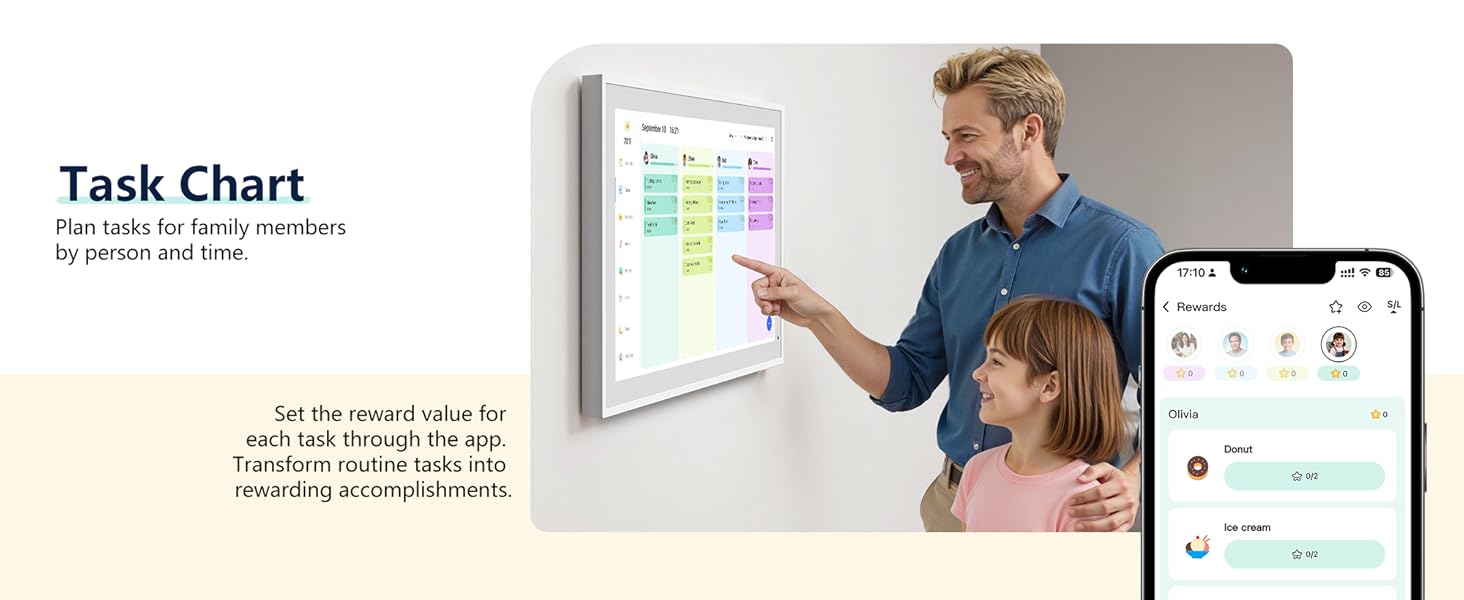
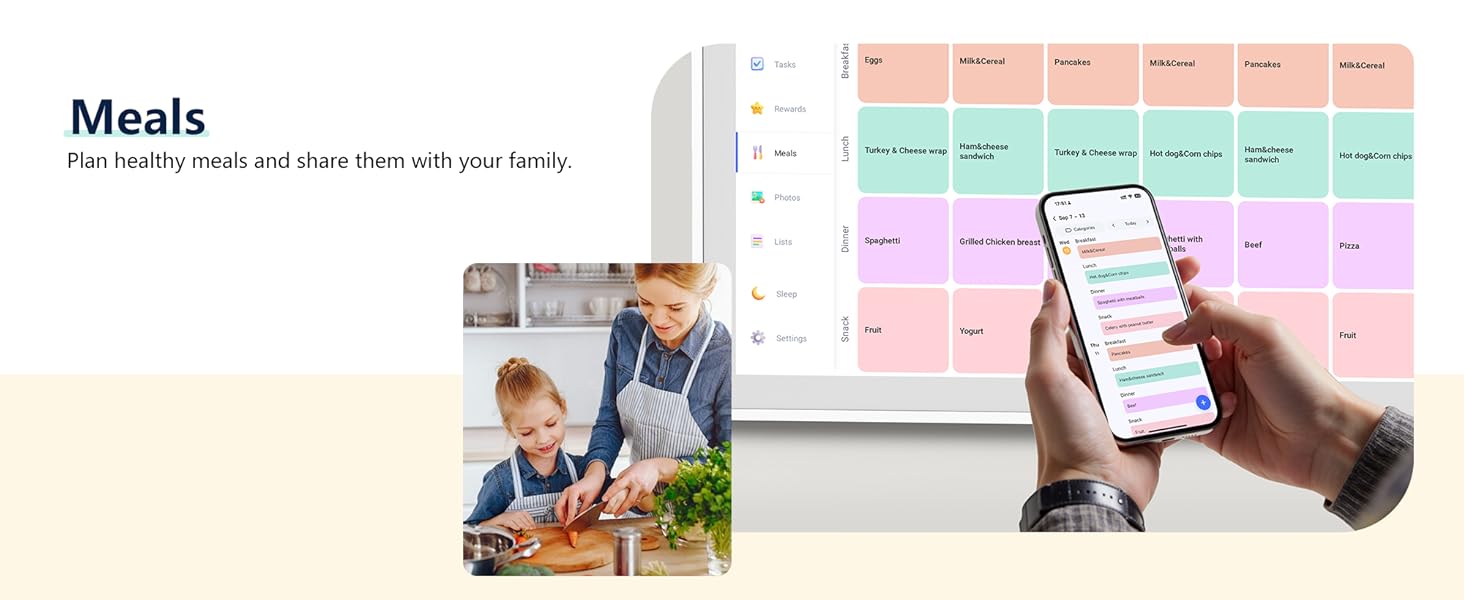
Interactive Task Chart & Meal Plans: Turn routines and to-do’s into opportunities for kids to earn stars and unlock custom rewards, keeping them engaged and motivated. Display weekly meal plans, no more “What’s for dinner?” . Take the guesswork out of mealtime with adedicated meal schedule that everyone can see.
Photo Display & Custom Lists: Display your favorite photographs when your calendar isn’t in use. You can even organize photos into albums to choose what gets featured! Custom lists for every adventure, from packing for a beach trip to getting ready for the holidays, create lists for everything and anything you need to remember.
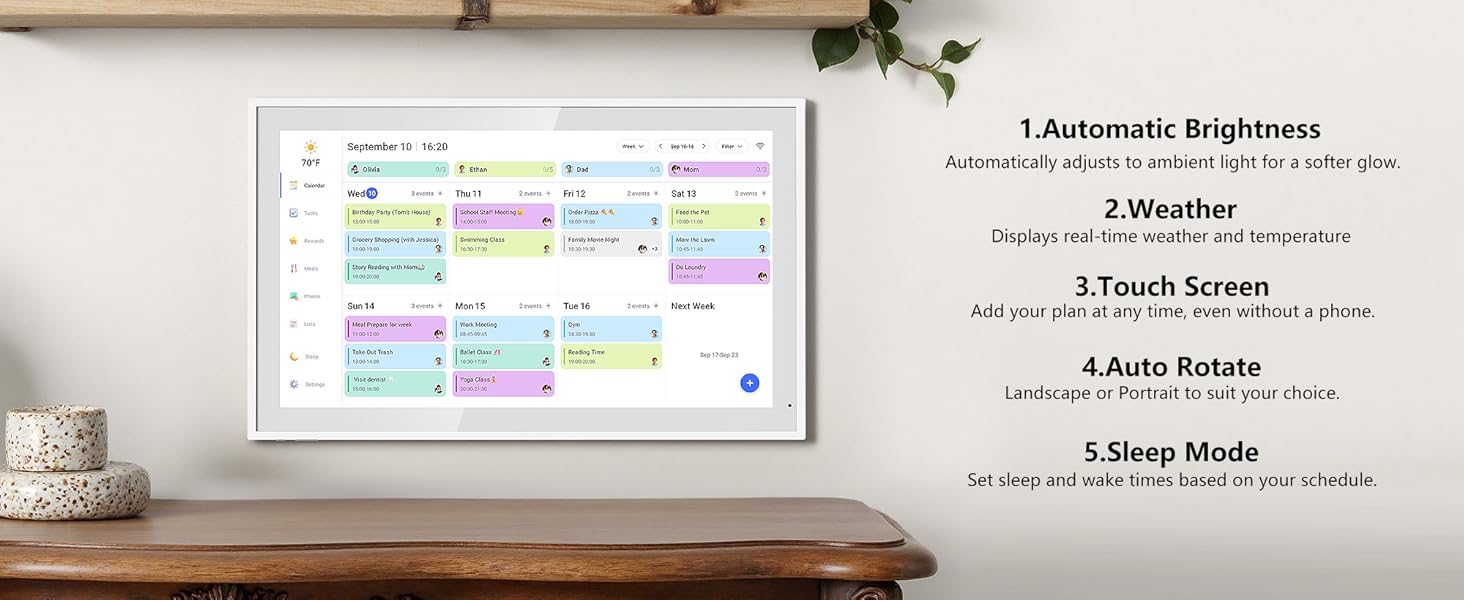
Weather & Sleep Mode: Stay prepared with precise weather forecasting for the exact time and location of your events (Provide weather forecasts for the next three days). Ensure your screen goes to sleep at the same time each night and wakes up at the same time each morning.
You Choose Wall Mount or Desk Mount: The HD smart Calendar that mounts easily to any wall or sits beautifully on a desktop. Whether it’s in the kitchen, hallway, dining room, or living room, it can be seamlessly integrated into your space and daily life. PS: Secure the screws to the wall, and you can install it directly on the wall.
8 reviews for Digital Calendar, 15.6 Inch Wall Planner Electronic Calendar & Chore Chart, Smart Touchscreen Interactive Display for Family Schedules, Great for Organizing Your Routines, Wall & Desk Mountable
Add a review
Related products


- SAR: ﷼37.48
- PKR: ₨ 2,781.12
- AED: AED36.69


- SAR: ﷼44.99
- PKR: ₨ 3,337.90
- AED: AED44.04


- SAR: ﷼337.65
- PKR: ₨ 25,052.32
- AED: AED330.52


- SAR: ﷼89.04
- PKR: ₨ 6,606.20
- AED: AED87.16


- SAR: ﷼112.53
- PKR: ₨ 8,348.92
- AED: AED110.15


- SAR: ﷼90.91
- PKR: ₨ 6,745.39
- AED: AED88.99


- SAR: ﷼97.52
- PKR: ₨ 7,235.36
- AED: AED95.46


Electronics
Roku Streaming Stick HD 2025 — HD Streaming Device for TV with Roku Voice Remote, Free & Live TV
- SAR: ﷼107.61
- PKR: ₨ 7,984.23
- AED: AED105.34
Big Family –
Changed our lifestyle and made our kids everyday chores a game
This digital calendar has quickly become the command center for our family of four. Between school drop-offs, after-school activities, work meetings, and household tasks, we used to juggle a mess of apps and sticky notes and markers that were running out in a few weeks. Now everything lives in one clean, easy-to-read hub. The shared schedule keeps everyone on the same page, and the built-in tasks and rewards system has been a game-changer for motivating our kids. They love checking off chores and seeing their progress, and we love that it actually helps keep the house running smoothly.The added features make it feel like more than just a calendar. Automatic weather updates help us prep for the day and when it’s not being used, it doubles as a gorgeous digital photo frame that fills our living room with family memories. It’s stylish, practical, and surprisingly easy to use. Application registration was straightforward through a QR code and you can even import gmail / icloud calendars to sync. Lag is not noticeable and auto dimming is great at night. Some photos attached.
Roman H. –
Big, bright, helpful)
The screen is bright and easy to read, the family organizer layout is super clean, and everyone can see schedules, tasks, and weather at a glance. Setup was fast, and it works smoothly without lag. The build quality feels premium, and the stand looks great on the counter.
Trini –
Amazing Calendar Keeps Me and My Family Organized
I love this handy calendar with everything I need to help keep me organized in one place. I used to keep to do lists, grocery lists, and a calendar of things written on so many different papers and stickys around the house and now I can keep them organized all in one place on this digital calendar. The best part is that it syncs to my phone so whether I’m at home or on the go, I know exactly what days my son has football practice and what the weather will be like, and I know what I need for a quick grocery run. I love how easy it is to use it with auto brightness, auto rotate, and touch screen. When my boss asks me if I can pick up a shift, I no longer have to tell her I’ll check my schedule when I get home. I can click on the app and see everything right from my phone. Meal planning has been easier to stay on track with because I’m able to plan my meals out for the week. I can even add recipes and then select that from the drop-down menu. It even has a reward system! When I am not using these amazing things to help keep my life in order, I can use the screen to preview photo slideshows of my friends and family.
Sleepy Hollow –
flyEVfish 15.6” Digital Calendar. Easy to set up and use.
So far so good. Fairly easy to set up and connect to your calendars (google, outlook, etc). Has a nice clean look that isn’t full of widgets and extra information that isn’t needed on a calendar. Easy to navigate and synchs quickly between phone, laptop and ecalendar. Very sturdy and was a great price, especially nice that you don’t have to subscribe to anything to use it.
Ramon Farinazo –
The Digital Calendar has completely revolutionized how my family manages our hectic daily lives
The Digital Calendar has completely revolutionized how my family manages our hectic daily lives, instantly earning its five stars. The large, smart touchscreen display makes updating schedules and appointments intuitive and easily visible from across the room. The Chore Chart and routine planning features have dramatically reduced arguments and confusion over household tasks. We especially love the versatility of the unit, as it looks sleek and modern whether it’s wall-mounted or standing on a desk. Everything from school events to doctor visits is now seamlessly organized in one central, easy-to-read location. If you want a brilliant, interactive hub to genuinely organize your family’s routine, this planner is an absolute must-buy.
Alex B –
Quality digital calender
The calendar portion has definitely helped my family stay on top of our schedule. It was a little time consuming set up but once that’s done it’s seamless. I add something to my phone calendar and within a minute or so it pops up on this one. I have zero complaints about this portion of the product.The tasks portion is lacking though. It’s not very customizable. For example my son is homeschooled so I have his daily work on there but it doesn’t allow me to only put it on Monday-Friday. I have to put it on all 7 days of the week and then delete it off of the weekends. Also every once in a while I’ll wake up in the morning and the tasks will all be on the screen twice and I’ll have to switch to a different day and then back to the current day for this to be corrected. Not a deal breaker just mildly annoying.The rewards portion is nice though. You can set different rewards per child and once they get a certain amount of stars they can redeem the reward of their choosing.I haven’t really ventured into the meal prepping portion too much but just what I’ve quickly seen compared to a skylight it’s definitely not as in depth (but it’s free vs a yearly subscription)For the $199 that it’s currently going for I’d say it’s a good deal. I paid $250 and after having it for a few months I think that’s a little too high but it still gets the job done.
Tiffany –
Game Changer for Busy Families!
This digital calendar is exactly what we needed to stay organized! The touchscreen is smooth and responsive, and the layout is super intuitive. Love how I can assign events to each family member with color coding. It looks sleek on the wall and keeps everyone in sync. A must-have for any household juggling multiple schedules!
Robin S. Thompson –
Poor Experience
We’re having a poor experience. Set up is not working for any member in the family. We get pop up error notifications that are not in the correct form of English (“Hola, pending” and “Something wrong” and the “bad response” notification pops up repeatedly).Given the poor English grammar in the app and the inability to set it up, along with the unfamiliar brand, this doesn’t appear to be a QA vetted product. We’ll give it a day to see if perhaps the app is crashing due to a high volume of new users on Christmas before we return it.