




ApoloSign 21.5″ Digital Calendar: Dual Mode Calendars with Google Play & Multi-calendar Sync, Electronic Planner & Chore Chart, Smart Touchscreen, Interactive Display for Family Schedules (Teak Wood, 21.5-inch)


Original price was: 499.99$.379.99$Current price is: 379.99$.
- SAR: ﷼1,425.23
- PKR: ₨ 105,827.22
- AED: AED1,395.25
Price: $499.99 - $379.99
(as of Jan 20, 2026 10:07:41 UTC – Details)
From the brand


All-in-One Family Calendar


First Dual-Mode Digital Calendar — In Calendar Mode, apolosign calendar stay focused with Auto Sync Calendar across Google, Outlook, iCloud & more. Planner and Family Organizer keep schedules in one place. Switch to Android Mode to create a Dashboard and smart family hub
Reward-Based Chore Chart, Routine & Meal Planner — Turn chores into fun while keeping the whole family organized. This electronic calendar lets kids earn rewards for completing daily tasks and helps build healthy routines. Create color-coded to-do lists for groceries, shopping, wish lists, and plan weekly meals to stay on top of family dining — all in one place via the Apolosign App (Currently available only in the U.S., Canada, and the U.K.)
Experience AI Voice Assistant & Smart Home Control — The Apolosign Smart Calendar lets you set alarms, check the weather, or manage tasks by simply talking to your calendar using four built-in microphones. Now preloaded with Google Gemini AI voice assistant, seamlessly connect with Google Home to monitor and control your smart home — doorbells, cameras, and more, all on one screen
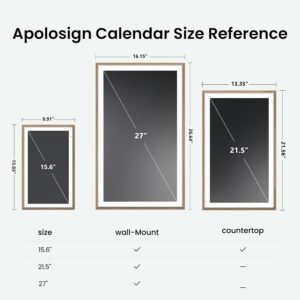
Smart Photo Frame & Live Screensaver — The 21.5″ HD touchscreen eCalendar displays memories from Google Photos and more, seamlessly, no subscription required. Personalize with videos, schedules, clocks, or a mix. Anti-glare matte glass reduces eye strain in bright rooms. Auto Brightness adapts, Sleep Mode saves energy. Beautiful faux wood frame for wall use
Customize Your Widget Dashboard — Smarter eCalendar: Add and arrange the widgets you need — calendar, chores, meals, weather, doorbell, music controls, stocks, and more. Supports multi-page widget layouts, so you can view more at a glance. Customize your dashboards for a smart family hub. Whether syncing calendars or troubleshooting, our expert support team is available around the clock to assist you
7 reviews for ApoloSign 21.5″ Digital Calendar: Dual Mode Calendars with Google Play & Multi-calendar Sync, Electronic Planner & Chore Chart, Smart Touchscreen, Interactive Display for Family Schedules (Teak Wood, 21.5-inch)
Add a review
Related products


- SAR: ﷼37.47
- PKR: ₨ 2,782.22
- AED: AED36.68


- SAR: ﷼1,125.17
- PKR: ₨ 83,547.22
- AED: AED1,101.50


- SAR: ﷼262.51
- PKR: ₨ 19,492.22
- AED: AED256.99


- SAR: ﷼187.50
- PKR: ₨ 13,922.22
- AED: AED183.55


- SAR: ﷼63.72
- PKR: ₨ 4,731.72
- AED: AED62.38


- SAR: ﷼90.88
- PKR: ₨ 6,748.06
- AED: AED88.97


- SAR: ﷼225.00
- PKR: ₨ 16,707.22
- AED: AED220.27


- SAR: ﷼44.97
- PKR: ₨ 3,339.22
- AED: AED44.02
Donald Marshick –
Great tool to keep the family organized
The ApoloSign Digital Calendar is a great tool for organizing a crazy schedule with kids. The setup was very easy and I was able to connect it to my google calendar with no issues. I have been debating about getting a digital calendar for about a year and I am glad that I decided to get this product. The screen is clear and it helps the whole family keep track of what is going on in our day to day lives. Also the ability to color code events and tasks for each family member is wonderful. Lastly, the product task list function is a great bonus on keeping our family organized. Great product and I definitely recommend purchasing.
S. Nuccio –
No subscription, fully featured calendar and smart home controller.
Super cool and works great. Setup was easy. I made a new Google account to be the primary so that everyone in their family can just add that account to the events they want to show. Creating routines (ie chores) was super easy as well and the kids are already competing to see who can get the most points.The ability to also be a tablet is great. I was able to install apps for our music (Sonos), lights (lutron), pool (pentair), security cameras (reo link), etc. The Kasa smart app was not compatible, but everything else was.
Granola Girl –
Great Digital Calendar
The ApoloSign digital calendar is fantastic!Installation was easy with the wall mounting bracket that it came with. We had it on the wall and were setting up the app in about 15 minutes.The set up was just as easy. We use Google for email and scheduling so it was a simple matter of downloading the ApoloSign app and signing into each of our Google accounts to grant the app access to our calendars.So far we have found the digital calendar to be very helpful not only in visibly seeing the entire family’s calendars side by side but also in its ability to assign tasks and chores to people and even create todos/shopping lists. We created a separate shopping list for each store so it’s very easy for us to see what we need at a particular store as opposed to having to scroll through a general list of items and decide which items to get from that store.It’s a good value for the price and looks great on the wall. Several friends have come over and asked about it already. Definitely recommend the ApoloSign digital calendar!
Sam Connell –
Just when I thought my wife couldn’t get more organized!
Got this as a Christmas gift for my VERY organized wife. She hasn’t stopped messing with this! Looks very good on the wall, and touch screen is very responsive.Many great features, but one of our favorites is the task system where we can assign points to the kids task and let them bank points to use on rewards. They love it and our house has stayed much cleaner because they are doing their chores!!10/10 would buy again. Speaking for myself, someone who isn’t a big calendar person, I have found myself stopping everytime I walk by this thing in the hallway just to see what’s going on and if there is anything needed to be done.Great value and great product.
Richard Cooper –
Helping Keep Our Family Organized
We’ve been using the Apolosign digital calendar for a couple of weeks now, and it’s been great so far. It’s made syncing all of our family calendars incredibly easy, so everyone knows what’s going on without constant reminders or texts.We especially love the task reminders—it’s simple to add shared to-dos for the entire family, which has helped us stay organized and on track. The photo feature is another favorite; using our pictures as a screensaver makes it feel personal and warm, not just functional.Setup was surprisingly easy. The design makes it simple to hang up, and the instructional videos were clear and helpful for learning all the how-tos. We were up and running quickly without any frustration.Overall, it’s a well-designed, practical, and family-friendly tool that’s already made daily life smoother. Highly recommend for busy households looking to stay organized in one central place.
Jake –
Great Hardware with Early Software Hurdles
The 21.5″ Apolosign is a beautiful, well-priced piece of hardware that acts as a bridge between a dedicated family hub and a full Android tablet. While it’s the best calendar integration I’ve used, the software feels “green” and needs a few key updates to reach its full potential.The ProsStunning Display: The large, high-definition touchscreen is vibrant and looks great whether on a swivel stand or a wall (if you’re interested in a stand I am using one made for the Echo Show 21 that works very well).Seamless Google Integration: Syncs perfectly with Google Calendar. The built-in task/reward system for kids is a fantastic motivator.True Android Versatility: Unlike locked-down hubs, you can install nearly any Google Play store apps (like Spotify or Google Nest), which look incredible and work great on this large screen.No Subscription Model: One of the things that drew me to this tablet was not only that it’s fairly priced, but also does not have a monthly paid subscription to use it. This is a big bonus, for sure.Engaging Support: The team seems very active in their community and responsive to feedback, even emailing me after I posted in the Apolosign community Facebook group, asking for feedback on how to improve their product (which I relayed to them).The Cons (As of January 2026)Clunky Mode Switching: Moving between the Calendar and Android OS is far too convoluted. It requires digging through multiple menus; it needs a simple “Switch” icon on the main hub. Since this is one of the main selling points of this “hybrid” tablet, it needs to be intuitive and easy/quick to do.Photo Screensaver Limitations: Integrates well with Google Photos. However, You cannot currently shuffle photos, meaning large albums always start at the beginning. It also lacks a “side-by-side” mode for vertical photos, leaving 2/3 of the screen empty, which is a huge waste of space on a large beautiful screen like this.Lack of Voice Control: Despite being an Android device, there is no intuitive “Always-on” voice activation (Google/Gemini) for kitchen timers or grocery lists while in calendar mode (that I have been able to find, at least).Minor Task/UI Issues: There is currently no way to retroactively “undo” a completed task if a child checks one off by mistake (or tries to pull a fast one on you). Since completing these tasks can earn points which are then used for rewards, there needs to be some sort of “undo” (perhaps behind a parent-locked password).Final Thoughts & SuggestionsThis is a high-potential device. To make it a 5-star essential, I’d love to see:Shuffle and Split-Screen options for photo albums.Seasonal Screensavers: More variety beyond beach scenes, forests and water (falling snow or a fireplace for those of us in colder climates during the winter months!).A “One-Tap” toggle to switch between Calendar and Android modes.I’m optimistic that the Apolosign team will address these via software updates. I will update this review as the OS evolves!
Sara Mann –
The Apolosign digital calendar is fantastic! Its intuitive interface makes scheduling a breeze, and I love the customization options. Syncing my kids and I calendar with my devices is seamless, ensuring I never miss an appointment. The reminders are a game changer for staying organized. Highly recommend this digital solution for anyone looking to simplify their planning!